Lab: Automating Arista EVPN/VXLAN Clos Fabrics with Ansible
Overview
This lab demonstrates how to use the Ansible Network Collection – Arista.Eos to build and provision a Clos fabric along with tenant configurations on Arista EOS devices, following Infrastructure as Code (IaC) principles.
The fabric design is based on an EVPN/VXLAN architecture. IPv6 is used in the underlay and overlay.
Lab files including Containerlab topology are available on GitHub.
Lab consists of following devices
- DC1 fabric:
spine1spine2leaf1leaf2leaf3leaf4
- Hosts:
host1host2host3
- Peers:
isp-router1isp-router2
Key components used
- Ansible Network Collection for Arista EOS devices -
Arista.Eos - Jinja2 templating
- GitLab CI/CD pipeline for automated validation and deployment
Automation architecture
Ansible inventory hierarchy:
all
└── arista
    └── DC1
        ├── leaf
        │   ├── leaf1
        │   ├── leaf2
        │   ├── leaf3
        │   └── leaf4
        │
        ├── spine
        │   ├── spine1
        │   └── spine2
        │
        ├── DC1_PORT_PROFILES
        │   └── leaf
        │       ├── leaf1
        │       ├── leaf2
        │       ├── leaf3
        │       └── leaf4
        │
        └── DC1_TENANT_SERVICES
            └── leaf
                ├── leaf1
                ├── leaf2
                ├── leaf3
                └── leaf4
Jinja2 template hierarchy:
base.j2
├── vlan.j2
├── vrf.j2
├── vxlan.j2
├── intf.j2
│   └── svi.j2
├── prefix-set.j2
└── bgp.j2
    ├── rpl.j2
    ├── mac-vrf.j2
    └── bgp-vrf.j2
Pipeline Overview
The GitLab pipeline defined in .gitlab-ci.yml consists of three stages:
- Build
- Approve
- Deploy
When changes to the fabric are made by modifying host or group variables, the Build stage is triggered. This stage generates the device configurations and commits them back to the repository. These changes are expected to be made from a feature branch, not from the main branch.
After verification, the generated configurations should be merged into the main branch, which triggers the pipeline to run again. On the main branch, the Approve and Deploy stages are executed.
The Approve stage requires manual confirmation before the configurations are deployed to the network devices in the Deploy stage.
Pipeline at Work:
In this example, a new VLAN 30 is introduced into the fabric and added to the allowed VLAN list of the port profile compute_servers_dc1.
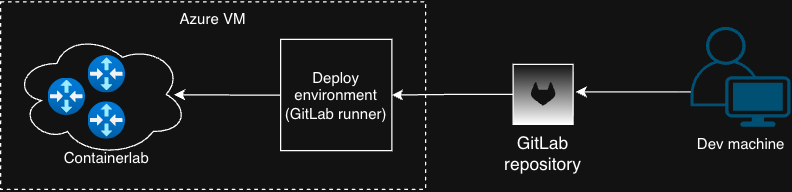
Figure: A network admin modifies the fabric configuration (for example adding VLAN 30), commits the changes to a feature branch, and pushes them to GitLab, which automatically triggers the CI/CD pipeline.
A new feature branch named VLAN30 is created to implement the change:
networkinglabs$ git checkout -b VLAN30
Switched to a new branch 'VLAN30'
The VLAN definition is added to the file DC1_TENANT_SERVICES.yml, and VLAN 30 is included in the allowed VLAN list of the compute_servers_dc1 port profile in the file DC1_PORT_PROFILES.yml. The following git diff shows the modifications:
networkinglabs$ git diff eos-eapi/group_vars/DC1_PORT_PROFILES.yml
diff --git a/eos-eapi/group_vars/DC1_PORT_PROFILES.yml b/eos-eapi/group_vars/DC1_PORT_PROFILES.yml
index 5d6cf3c..8e7901c 100644
--- a/eos-eapi/group_vars/DC1_PORT_PROFILES.yml
+++ b/eos-eapi/group_vars/DC1_PORT_PROFILES.yml
@@ -1,7 +1,7 @@
 port_profiles:
     compute_servers_dc1:
         mode: trunk
-        allowed_vlans: 10,20
+        allowed_vlans: 10,20,30
         native_vlan: 1000
     baremetal:
         mode: access
networkinglabs$ git diff eos-eapi/group_vars/DC1_TENANT_SERVICES.yml
diff --git a/eos-eapi/group_vars/DC1_TENANT_SERVICES.yml b/eos-eapi/group_vars/DC1_TENANT_SERVICES.yml
index 4317dfb..6969e63 100644
--- a/eos-eapi/group_vars/DC1_TENANT_SERVICES.yml
+++ b/eos-eapi/group_vars/DC1_TENANT_SERVICES.yml
@@ -3,6 +3,8 @@ vlans:
     id: 10
   L2_VLAN_20:
     id: 20
+  L2_VLAN_30:
+    id: 30
   L2_VLAN_3000:
     id: 3000
 vrfs:
The changes are then staged and committed to the feature branch:
networkinglabs$ git add .
networkinglabs$ git commit -am "Adding VLAN 30 to the fabric"
[VLAN30 11b3f1b] Adding VLAN 30 to the fabric
 2 files changed, 3 insertions(+), 1 deletion(-)
Once committed, the changes can be pushed to the remote repository, which triggers the GitLab CI pipeline for the feature branch.
networkinglabs$ git push origin VLAN30
Enter passphrase for key '/home/danielblazek/.ssh/id_rsa':
Enumerating objects: 11, done.
Counting objects: 100% (11/11), done.
Delta compression using up to 10 threads
Compressing objects: 100% (6/6), done.
Writing objects: 100% (6/6), 546 bytes | 546.00 KiB/s, done.
Total 6 (delta 4), reused 0 (delta 0), pack-reused 0
remote:
remote: To create a merge request for VLAN30, visit:
remote:   https://gitlab.com/DanielBlazek18/networkinglabs/-/merge_requests/new?merge_request%5Bsource_branch%5D=VLAN30
remote:
To gitlab.com:DanielBlazek18/networkinglabs.git
 * [new branch]      VLAN30 -> VLAN30
Pipeline Execution
After pushing the changes to the remote repository, the Build stage of the GitLab pipeline is triggered automatically. During this stage, the CI runner executes the Ansible playbook responsible for generating device configurations from the Jinja2 templates. The pipeline runs the build task, which renders device configurations using the base.j2 template and assembles the final configuration files for each switch affected by the change in the fabric. Once the configurations are generated, they are automatically committed back to the repository by the CI runner. The following output shows the pipeline execution:
Running with gitlab-runner 18.8.0 (9ffb4aa0)
  on eos-eapi ZgXdGRjPF, system ID: s_406339cfddb2
Preparing the "shell" executor 00:00
Using Shell (bash) executor...
Preparing environment 00:01
Running on bnet-containerlab...
Getting source from Git repository 00:01
Gitaly correlation ID: 9d876b1f8b748869-AMS
Fetching changes with git depth set to 20...
Reinitialized existing Git repository in /home/gitlab-runner/builds/ZgXdGRjPF/0/DanielBlazek18/networkinglabs/.git/
Checking out 11b3f1bb as detached HEAD (ref is VLAN30)...
Skipping Git submodules setup
Executing "step_script" stage of the job script 00:06
$ git config --global alias.hist "log --all --decorate --oneline --graph"
$ git config --global user.name "bnet-containerlab-runner"
$ git config --global user.email "lab@danielblazek.cz"
$ git fetch origin $CI_COMMIT_REF_NAME
From https://gitlab.com/DanielBlazek18/networkinglabs
 * branch            VLAN30     -> FETCH_HEAD
$ git checkout -B $CI_COMMIT_REF_NAME origin/$CI_COMMIT_REF_NAME
Switched to a new branch 'VLAN30'
Branch 'VLAN30' set up to track remote branch 'VLAN30' from 'origin'.
$ ansible-playbook eos-eapi/play_fabric_config.yml --tags build -i eos-eapi/inventory.yml
PLAY [Build Arista DC Fabirc] **************************************************
TASK [dc_fabric_config : Create Config Directory] ******************************
ok: [leaf1]
TASK [dc_fabric_config : Create Temp Directory per Node] ***********************
changed: [leaf1]
changed: [leaf3]
changed: [leaf2]
changed: [leaf4]
changed: [spine1]
changed: [spine2]
TASK [dc_fabric_config : Set build directory fact] *****************************
ok: [leaf1]
ok: [leaf2]
ok: [leaf3]
ok: [leaf4]
ok: [spine1]
ok: [spine2]
TASK [dc_fabric_config : Generate configuration from the base.j2] **************
changed: [leaf4]
changed: [leaf1]
changed: [leaf3]
changed: [spine1]
changed: [leaf2]
changed: [spine2]
TASK [dc_fabric_config : Remove Old Assembled Config] **************************
changed: [leaf1]
changed: [leaf2]
changed: [leaf3]
changed: [leaf4]
changed: [spine1]
changed: [spine2]
TASK [dc_fabric_config : Build Final Device Configuration] *********************
changed: [leaf3]
changed: [leaf1]
changed: [leaf4]
changed: [spine1]
changed: [leaf2]
changed: [spine2]
TASK [dc_fabric_config : Remove Build Directory] *******************************
changed: [leaf1]
PLAY RECAP *********************************************************************
leaf1                      : ok=7    changed=5    unreachable=0    failed=0    skipped=0    rescued=0    ignored=0
leaf2                      : ok=5    changed=4    unreachable=0    failed=0    skipped=0    rescued=0    ignored=0
leaf3                      : ok=5    changed=4    unreachable=0    failed=0    skipped=0    rescued=0    ignored=0
leaf4                      : ok=5    changed=4    unreachable=0    failed=0    skipped=0    rescued=0    ignored=0
spine1                     : ok=5    changed=4    unreachable=0    failed=0    skipped=0    rescued=0    ignored=0
spine2                     : ok=5    changed=4    unreachable=0    failed=0    skipped=0    rescued=0    ignored=0
$ git add eos-eapi/configs/.
$ git commit -am "$(git log -1 --pretty=%s) [CONFIG BUILD BY CICD]" || echo "Nothing to commit"
[VLAN30 0c7082a] Adding VLAN 30 to the fabric [CONFIG BUILD BY CICD]
 4 files changed, 36 insertions(+), 4 deletions(-)
$ git push https://oauth2:${GITLAB_TOKEN}@gitlab.com/DanielBlazek18/networkinglabs.git HEAD:$CI_COMMIT_REF_NAME
remote:
remote: To create a merge request for VLAN30, visit:
remote:   https://gitlab.com/DanielBlazek18/networkinglabs/-/merge_requests/new?merge_request%5Bsource_branch%5D=VLAN30
remote:
To https://gitlab.com/DanielBlazek18/networkinglabs.git
   11b3f1b..0c7082a  HEAD -> VLAN30
Cleaning up project directory and file based variables 00:00
Job succeeded
Merge and Deployment
After verifying the generated configurations, the VLAN30 feature branch is merged into the main branch. This action triggers the GitLab pipeline again, this time executing all three stages:
- Build
- Approve
- Deploy
Since the configurations were already generated in the feature branch pipeline, the Build stage completes without introducing additional changes. The Approve stage requires manual confirmation before proceeding. Once approved, the Deploy stage runs and applies the configuration changes to the fabric devices. During the Deploy stage, the Ansible playbook provisions the updated configuration on all affected switches in the fabric:
Running with gitlab-runner 18.8.0 (9ffb4aa0)
  on eos-eapi ZgXdGRjPF, system ID: s_406339cfddb2
Preparing the "shell" executor 00:00
Using Shell (bash) executor...
Preparing environment 00:00
Running on bnet-containerlab...
Getting source from Git repository 00:01
Gitaly correlation ID: 9d8770085eaf8869-AMS
Fetching changes with git depth set to 20...
Reinitialized existing Git repository in /home/gitlab-runner/builds/ZgXdGRjPF/0/DanielBlazek18/networkinglabs/.git/
Checking out 56c155a8 as detached HEAD (ref is main)...
Skipping Git submodules setup
Executing "step_script" stage of the job script 00:05
$ ansible-playbook eos-eapi/play_fabric_config.yml --tags deploy -i eos-eapi/inventory.yml
PLAY [Build Arista DC Fabirc] **************************************************
TASK [Provision fabric configuration on switches] ******************************
changed: [spine1]
changed: [leaf3]
changed: [leaf4]
changed: [leaf1]
changed: [leaf2]
changed: [spine2]
PLAY RECAP *********************************************************************
leaf1                      : ok=1    changed=1    unreachable=0    failed=0    skipped=0    rescued=0    ignored=0
leaf2                      : ok=1    changed=1    unreachable=0    failed=0    skipped=0    rescued=0    ignored=0
leaf3                      : ok=1    changed=1    unreachable=0    failed=0    skipped=0    rescued=0    ignored=0
leaf4                      : ok=1    changed=1    unreachable=0    failed=0    skipped=0    rescued=0    ignored=0
spine1                     : ok=1    changed=1    unreachable=0    failed=0    skipped=0    rescued=0    ignored=0
spine2                     : ok=1    changed=1    unreachable=0    failed=0    skipped=0    rescued=0    ignored=0
Cleaning up project directory and file based variables 00:01
Job succeeded
Configuration Verification
After the deployment completes, VLAN 30 is successfully provisioned across all leaf switches in the fabric. Example verification from leaf1:
leaf1#sh vlan id 30
VLAN  Name                             Status    Ports
----- -------------------------------- --------- -------------------------------
30    L2_VLAN_30                       active    Vx1
leaf1#sh run int po1-2 | in interface|allowed
interface Port-Channel1
   switchport trunk allowed vlan 10,20,30
interface Port-Channel2
   switchport trunk allowed vlan 10,20,30
Note
This lab demonstrates a basic implementation of Ansible, Jinja2, and a GitLab CI/CD pipeline to build and provision a fabric. In real-world deployments, Arista typically uses the AVD (Arista Validated Designs) collection together with CloudVision (CVP) for automated network provisioning and management.